| Page 1 of 28 |
|
|
 Posted: Sun, 12th Jun 2011 01:27 Post subject: Your mouse - what is it, and why? Posted: Sun, 12th Jun 2011 01:27 Post subject: Your mouse - what is it, and why? |
|
 |
I roll with this:

The Razer Copperhead. Basically, I wanted to get competitive with CSS, and felt my then current mouse, which was a logitech didn't quite fit. You see, I liked to move my mouse with only my fingertips, and logitech mice, I found, are not really good for that - or weren't at that time. I also played very high sens, and didn't like to move my whole hand, only my fingers.
And then I bought one of those puppies for around 55-60 euros, and was very pleased. IIRC it came cheap as well.
Thing is, Razer mice kick ass. Not from the very first moment, but by two weeks time I felt the difference already, it's really a kick ass product, and this current one has been with me for 5+ years.
What do you roll with, and why?
|
|
| Back to top |
|
|
|
|
| Posted: Sun, 12th Jun 2011 01:41 Post subject: |
|
|
My mx500 died after I think more than 6-7(maybe more?) years of constant usage due to broken cable (twice).

Well it's from my employer and a free laser mouse is always nice to use 

This is the other moues that is currently attached to my work notebook. And it is such a hideous POS! The scroll "wheel" is a button that you can push up and down. And no matter what, it is ALWAYS too fucking fast. And the sensor isn't any good either. I got this from work too.

And I got this one too from work. Supposedly better for traveling, but it's too tiny and the cable is pure shit as it is sensor.
Time for me to get myself a nice MX518 or something similar *wired mouse with good sensor, preferably laser*
|
|
| Back to top |
|
|
Przepraszam
VIP Member
Posts: 14823
Location: Poland. New York.
|
| Posted: Sun, 12th Jun 2011 01:49 Post subject: |
|
|
I used to own Razer Copperhead and it was amazing.
Right now I use

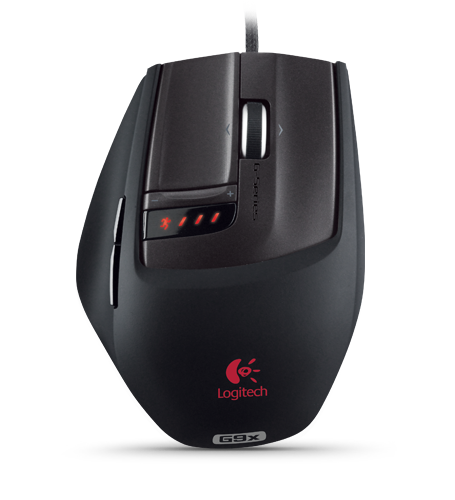
But gonna replace it soon probably with this because OCZ Behemoth is slowly dying
G9x
|
|
| Back to top |
|
|
LeoNatan
☢ NFOHump Despot ☢
Posts: 75450
Location: Israel
|
| Posted: Sun, 12th Jun 2011 02:31 Post subject: |
|
|
I use G9. It's comfortable and precise. And the smooth wheel mode is priceless.
|
|
| Back to top |
|
|
|
|
| Posted: Sun, 12th Jun 2011 02:42 Post subject: |
|
|
Is it as comfortable as my good old mx500?
|
|
| Back to top |
|
|
LeoNatan
☢ NFOHump Despot ☢
Posts: 75450
Location: Israel
|
| Posted: Sun, 12th Jun 2011 02:56 Post subject: |
|
|
Well I used to have a G7 before the 9, which ~ of similar build, and I have to say, I prefer the 9 much more.
|
|
| Back to top |
|
|
ixigia
[Moderator] Consigliere
Posts: 65378
Location: Italy
|
| Posted: Sun, 12th Jun 2011 03:02 Post subject: |
|
|
The mighty Logitech MX518:

I followed the Humpers' advices and I must say I'm very happy with the results, it was also quite cheap which helped my decision 
I have another mini-mice for the laptop (Logitech as well), but can't remember the name.. it's quite crappy though 
|
|
| Back to top |
|
|
|
|
|
| Back to top |
|
|
|
|
| Posted: Sun, 12th Jun 2011 03:13 Post subject: |
|
|
|
|
|
| Back to top |
|
|
Grale
Banned
Posts: 3328
Location: Invert
|
|
| Back to top |
|
|
|
|
| Posted: Sun, 12th Jun 2011 09:14 Post subject: |
|
|


>>>> >>>>>>> >>>>>>>>> ♪ Viva La Vida ♪ <<<<<< <<<<< <<<<<< <<< |
|
| Back to top |
|
|
|
|
| Posted: Sun, 12th Jun 2011 10:51 Post subject: |
|
|
Currently this:

It serves me nicely, can't really complain, but I'd like to have that Logitech wireless Performance MX. It looks uber sexy and it's wireless, which would come in handy.
But me being with absolutely no money makes it hard to get one 
"Quantum mechanics is actually, contrary to it's reputation, unbeliveably simple, once you take the physics out."
Scott Aaronson | chiv wrote: | | thats true you know. newton didnt discover gravity. the apple told him about it, and then he killed it. the core was never found. |
|
|
| Back to top |
|
|
|
|
|
| Back to top |
|
|
|
|
| Posted: Sun, 12th Jun 2011 11:35 Post subject: |
|
|
I have some old Trust mouse. Cost me like 8$ if I remember correctly.
I don't need anything better.
|
|
| Back to top |
|
|
|
|
| Posted: Sun, 12th Jun 2011 12:20 Post subject: |
|
|
Razer Copperhead for the moment. Will be switching it for the Razer Mamba 4G in a few weeks.
|
|
| Back to top |
|
|
Werelds
Special Little Man
Posts: 15098
Location: 0100111001001100
|
| Posted: Sun, 12th Jun 2011 12:29 Post subject: |
|
|
G500:
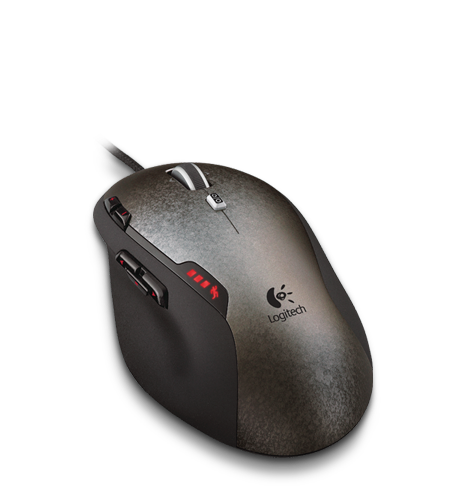
Before that: G5, MX518, MX500, Dual Optical - see the trend yet? Only mouse which fits my hand properly, it's built better than those flimsy Razer mice and with the G500 now, the free scroll mode is absolutely priceless.
|
|
| Back to top |
|
|
garus
VIP Member
Posts: 34196
|
| Posted: Sun, 12th Jun 2011 13:32 Post subject: |
|
|
snip
Last edited by garus on Tue, 27th Aug 2024 21:58; edited 1 time in total
|
|
| Back to top |
|
|
Aeon
Posts: 8705
Location: Netherlands
|
|
| Back to top |
|
|
|
|
|
| Back to top |
|
|
Gomp
Posts: 626
Location: Norway
|
| Posted: Sun, 12th Jun 2011 15:36 Post subject: |
|
|
G5 for daily use.
Mx518 for teh lappy
|
|
| Back to top |
|
|
Epsilon
Dr. Strangelove
Posts: 9240
Location: War Room
|
| Posted: Sun, 12th Jun 2011 15:48 Post subject: |
|
|
The G9 is quite comfortable, the G9x isn't. Due to the fact it being slightly smaller, if you find the G9 comfortable, you might not find the G9x to be.
I used the G9 for a couple of years before the rubber on the side started falling off, so I know how good it is/was.
|
|
| Back to top |
|
|
|
|
|
| Back to top |
|
|
|
|
|
| Back to top |
|
|
ixigia
[Moderator] Consigliere
Posts: 65378
Location: Italy
|
| Posted: Sun, 12th Jun 2011 17:02 Post subject: |
|
|
| sabin1981 wrote: | | I'll buy a new mouse once this one dies ... and it will be another MX518 |
Haha that's true love  (I'll probably end up doing the same, it's a great mouse indeed ) (I'll probably end up doing the same, it's a great mouse indeed ) |
|
| Back to top |
|
|
|
|
|
| Back to top |
|
|
|
|
|
| Back to top |
|
|
|
|
|
| Back to top |
|
|
xExtreme
Posts: 5810
Location: 43 6C 75 6A 2D 4E 61 70 6F 63 61
|
| Posted: Sun, 12th Jun 2011 19:10 Post subject: |
|
|
|
|
|
| Back to top |
|
|
|
|
| Posted: Sun, 12th Jun 2011 21:07 Post subject: |
|
|
I almost got the mx518 but It was bascialy the same as my G7, that mouse worked well cordless for long time but finaly got put in the draw as got fed up repairing the contacts on one of the micro switches that go duff after pronlonged use.
I now roll with one of these and its a great and very handy for all my gaming needs

|
|
| Back to top |
|
|
vurt
Posts: 14784
Location: Sweden
|
| Posted: Sun, 26th Jun 2011 15:04 Post subject: |
|
|
Logitech G9.
I don't like "round" mouses like my old Logitech MX 518, its presses against the hand in a very uncomfortable way, it does feel nice when using it for short periods though. I really like the G9's flatness, and how i can change weight and even grip, best mouse i've used, not gonna replace anytime soon. Not sure what the changes are with G9x?
|
|
| Back to top |
|
|
| Page 1 of 28 |
All times are GMT + 1 Hour |